Deploy a Sentinel gateway
Architecture
What you deploy
One stateless container per team, running in your own cloud account. Your applications send LLM requests to it instead of to the provider, and it applies your guardrails on the way through. Policy and activity live in the SUPERWISE control plane.
The gateway keeps no data store of its own. It holds nothing between requests, so there is no state to persist and none to synchronize between instances.
How the gateway reaches the control plane
The gateway opens every connection itself. It sends a heartbeat to the control plane every 60 seconds, and the control plane returns that gateway's current configuration in the reply. Nothing is ever pushed inward.
- Outbound only. The control plane needs no network access to your gateway and no visibility into the network it runs on, so a gateway can sit entirely inside a private subnet. It only has to be able to reach SUPERWISE. Prompts and model responses are never sent to SUPERWISE at all, as described in Data privacy.
- Configuration lands within a minute. A policy or guardrail change made in the app takes effect on the next heartbeat.
- Status follows the heartbeat. A gateway is Pending until the first heartbeat arrives, then Active. After 10 consecutive misses, 10 minutes, it returns to Pending.
Platforms
Runs on any Docker-based platform
The gateway is a standard container, so it runs wherever you already run containers: Kubernetes, OpenShift, ECS, Cloud Run, Container Apps, Docker Swarm, Nomad, or a plain Docker host. Pick your compute platform on its own merits. Sentinel fits into whatever you have.
For Kubernetes on any platform, SUPERWISE publishes a Helm chart. The three walkthroughs below are worked examples on the managed container services, not a ranking.
| What it needs | AWS example | GCP example | Azure example |
|---|---|---|---|
| Compute Always on, CPU allocated between requests, because the gateway heartbeats every 60 seconds |
ECS Express Mode scaling target, minimum 2 tasks |
Cloud Run--min-instances=1, --no-cpu-throttling |
Container Apps--min-replicas 1 |
| HTTPS endpoint Reachable by your callers, registered through SENTINEL_EXTERNAL_HOST |
Provisioned, AWS-managed certificate on an assigned hostname | Built in, managed certificate | Built in, managed certificate |
| Secret injection Three identity values as environment variables, read at container start |
Secrets Manager, via the task execution role full ARNs, including the suffix |
Secret Manager, via the service account | Key Vault, via managed identity |
| Health check path The gateway answers /healthz, and returns 404 on / |
Set explicitly, the default is / |
Not used | Probe defaults to /, does not block routing |
| Long-response timeout Responses stream, and short timeouts truncate long turns |
Raise the provisioned ALB idle timeout from its 60s default | --timeout=3600 |
Ingress request timeout, set explicitly |
| Kubernetes Any distribution, including OpenShift and self-managed |
EKS with the SUPERWISE Helm chart | GKE with the SUPERWISE Helm chart | AKS with the SUPERWISE Helm chart |
Prerequisites
Before you deploy
- A SUPERWISE API client ID and secret, issued once for your organization. See Generate tokens.
- An API key for at least one LLM provider you already use
- Deploy access to the cloud account, and your cloud CLI authenticated
Create the Sentinel
In the SUPERWISE app, open Sentinels, select Add Sentinel, give it a name, and leave Default policy selected.
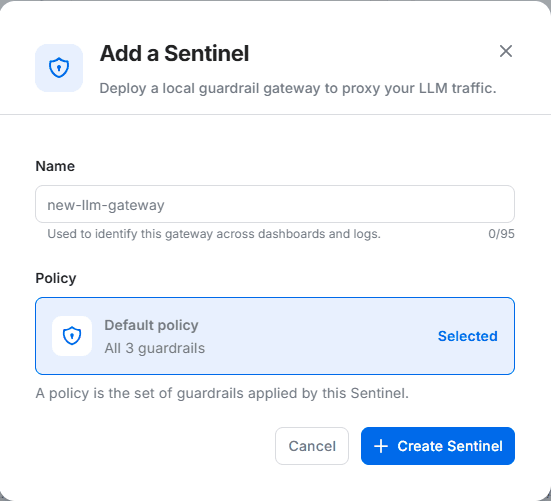
Copy the Sentinel ID. Every deployment below reads it, along with your client credentials, as environment variables:
SENTINEL_ID           # one per gateway
SW_CLIENT_ID          # one per organization
SW_CLIENT_SECRET      # one per organization
SENTINEL_EXTERNAL_HOST # the public HTTPS URL of this gateway
Give every per-gateway resource its own name, and keep shared resources on one name. Two teams following this page in the same account or project must not collide, and must never overwrite each other's Sentinel ID.
All three recipes produce a gateway reachable from the internet, which is what the verification step assumes. The gateway holds no provider credentials, since callers pass their own key through. If your security policy requires restricted access, put the gateway behind your existing controls before sending production traffic.
Always set SENTINEL_EXTERNAL_HOST. Left unset, the gateway registers the container's internal IP address, and the Connect snippets in the app point somewhere nobody can reach. On every platform below the URL exists only after the first deploy, so setting it is a second step.

AWS deployment
ECS Express ModeExpress Mode provisions the load balancer, HTTPS certificate, target groups, security groups, and auto scaling for you. It pulls directly from the SUPERWISE registry, so no image mirroring is needed. Requires AWS CLI 2.36 or later.
1. Cluster, roles, and secrets
aws ecs create-cluster --cluster-name "sentinel-${TEAM}"

# Execution role: pulls the image and reads the secrets
aws iam create-role --role-name "sentinel-execution-role-${TEAM}" \
  --assume-role-policy-document '{"Version":"2012-10-17","Statement":[{"Effect":"Allow",
    "Principal":{"Service":"ecs-tasks.amazonaws.com"},"Action":"sts:AssumeRole"}]}'
aws iam attach-role-policy --role-name "sentinel-execution-role-${TEAM}" \
  --policy-arn arn:aws:iam::aws:policy/service-role/AmazonECSTaskExecutionRolePolicy

# Infrastructure role: provisions the load balancer and networking
aws iam create-role --role-name "sentinel-infra-role-${TEAM}" \
  --assume-role-policy-document '{"Version":"2012-10-17","Statement":[{"Effect":"Allow",
    "Principal":{"Service":"ecs.amazonaws.com"},"Action":"sts:AssumeRole"}]}'
aws iam attach-role-policy --role-name "sentinel-infra-role-${TEAM}" \
  --policy-arn arn:aws:iam::aws:policy/service-role/AmazonECSInfrastructureRoleforExpressGatewayServices

# Per gateway: one secret per team
aws secretsmanager create-secret --name "sentinel/${TEAM}/SENTINEL_ID" \
  --secret-string "$SENTINEL_ID" --query ARN --output text

# Per organization: create once, reuse for every gateway
for n in SW_CLIENT_ID SW_CLIENT_SECRET; do
  aws secretsmanager describe-secret --secret-id "sentinel/$n" >/dev/null 2>&1 \
    || aws secretsmanager create-secret --name "sentinel/$n" --secret-string "${!n}"
  aws secretsmanager describe-secret --secret-id "sentinel/$n" --query ARN --output text
done

sleep 60   # let the roles propagate before first use
Grant the execution role secretsmanager:GetSecretValue on those three ARNs.
Use the full secret ARNs, including the random suffix Secrets Manager appends, in the IAM policy's Resource field. The suffix-less short form resolves in the container definition but silently fails to match in an IAM policy.
2. Create the service and capture its URL
GATEWAY_URL=$(aws ecs create-express-gateway-service \
  --service-name "sentinel-${TEAM}" \
  --cluster "sentinel-${TEAM}" \
  --execution-role-arn "arn:aws:iam::${ACCOUNT_ID}:role/sentinel-execution-role-${TEAM}" \
  --infrastructure-role-arn "arn:aws:iam::${ACCOUNT_ID}:role/sentinel-infra-role-${TEAM}" \
  --health-check-path "/healthz" \
  --scaling-target '{"minTaskCount":2,"maxTaskCount":10}' \
  --primary-container '{
    "image": "us-central1-docker.pkg.dev/admina33d6818/sentinel-public/sentinel:latest",
    "containerPort": 8000,
    "secrets": [
      {"name":"SENTINEL_ID","valueFrom":"<SENTINEL_ID secret ARN>"},
      {"name":"SW_CLIENT_ID","valueFrom":"<SW_CLIENT_ID secret ARN>"},
      {"name":"SW_CLIENT_SECRET","valueFrom":"<SW_CLIENT_SECRET secret ARN>"}
    ]
  }' \
  --query "service.activeConfigurations[0].ingressPaths[0].endpoint" --output text)

echo "$GATEWAY_URL" # https://se-<id>.ecs.<region>.on.awsAlways pass --health-check-path "/healthz". The AWS CLI help states the default is /ping; the target group is actually created with /, which the gateway answers with a 404. Tasks then start, heartbeat, and get replaced in a loop.
This failure looks like success from the SUPERWISE side. The Sentinel reports active the whole time, because each task really does heartbeat before the load balancer kills it. Check the ECS service events if traffic fails against a Sentinel that shows active.
The URL is a generated identifier, not your service name, and routing is host-header only. The load balancer's own DNS name returns a 404 from the balancer itself rather than from the gateway. Use the assigned hostname, which carries a valid AWS-managed certificate and needs no ACM or DNS work.
If $GATEWAY_URL comes back empty, the load balancer is still provisioning. Wait a minute, then read the URL from the service detail page in the ECS console.
3. Register the URL
aws ecs update-express-gateway-service \
  --service-arn "<service ARN>" \
  --primary-container '{ ...same block, plus: ...
    "environment": [{"name":"SENTINEL_EXTERNAL_HOST","value":"'"$GATEWAY_URL"'"}]
  }'
Updates run blue/green, so two tasks and two target groups during a rollout are expected. Raise the provisioned load balancer's idle timeout from its 60-second default, or long streaming responses will be cut.

GCP deployment
Cloud RunCloud Run supplies the HTTPS endpoint and certificate, so no load balancer is required. Two flags compensate for its per-request CPU model.
1. Store the identity values
SA="sentinel-gw-${TEAM}@${PROJECT_ID}.iam.gserviceaccount.com"
gcloud iam service-accounts create "sentinel-gw-${TEAM}"

# Per gateway: one secret per team
gcloud secrets create "SENTINEL_ID_${TEAM}" --replication-policy=automatic
printf '%s' "$SENTINEL_ID" | gcloud secrets versions add "SENTINEL_ID_${TEAM}" --data-file=-
gcloud secrets add-iam-policy-binding "SENTINEL_ID_${TEAM}" \
  --member="serviceAccount:${SA}" --role="roles/secretmanager.secretAccessor"

# Per organization: create once, then grant this gateway read access
for n in SW_CLIENT_ID SW_CLIENT_SECRET; do
  gcloud secrets describe "$n" >/dev/null 2>&1 || {
    gcloud secrets create "$n" --replication-policy=automatic
    printf '%s' "${!n}" | gcloud secrets versions add "$n" --data-file=-; }
  gcloud secrets add-iam-policy-binding "$n" \
    --member="serviceAccount:${SA}" --role="roles/secretmanager.secretAccessor"
done
2. Deploy, then register the URL
gcloud run deploy "sentinel-gateway-${TEAM}" \
  --image="us-central1-docker.pkg.dev/admina33d6818/sentinel-public/sentinel:latest" \
  --region="$REGION" --port=8000 --timeout=3600 \
  --min-instances=1 --no-cpu-throttling \
  --service-account="$SA" --allow-unauthenticated \
  --update-secrets="SENTINEL_ID=SENTINEL_ID_${TEAM}:latest,SW_CLIENT_ID=SW_CLIENT_ID:latest,SW_CLIENT_SECRET=SW_CLIENT_SECRET:latest"

GATEWAY_URL=$(gcloud run services describe "sentinel-gateway-${TEAM}" \
  --region="$REGION" --format="value(status.url)")

gcloud run services update "sentinel-gateway-${TEAM}" --region="$REGION" \
--update-env-vars="SENTINEL_EXTERNAL_HOST=${GATEWAY_URL}"--min-instances=1 and --no-cpu-throttling are not tuning choices. Cloud Run allocates CPU per request, which stops the heartbeat timer between calls, and a service left on the defaults goes pending within 10 minutes.
To restrict an already-deployed service later, drop the allUsers binding and grant roles/run.invoker to specific identities. There is no --allow-unauthenticated flag on gcloud run services update, so use add-iam-policy-binding.

Azure deployment
Container AppsContainer Apps supplies the HTTPS endpoint and certificate, and pulls directly from the SUPERWISE registry. Set minimum replicas to 1 so the heartbeat survives idle periods.
1. Register the provider and create the environment
az provider register --namespace Microsoft.App   # takes about a minute
az provider show --namespace Microsoft.App --query registrationState --output tsv

az group create --name "$RG" --location "$LOCATION"
az containerapp env create --name "$ENV" --resource-group "$RG" --location "$LOCATION"
A Container Apps environment is a separate resource that must exist before the app can be created. If no Log Analytics workspace is given, Azure generates one and warns rather than failing.
2. Deploy
az containerapp create \
  --name "sentinel-gateway-${TEAM}" \
  --resource-group "$RG" --environment "$ENV" \
  --image us-central1-docker.pkg.dev/admina33d6818/sentinel-public/sentinel:latest \
  --target-port 8000 --ingress external \
  --min-replicas 1 \
  --secrets sentinel-id="$SENTINEL_ID" sw-client-id="$SW_CLIENT_ID" sw-client-secret="$SW_CLIENT_SECRET" \
  --env-vars SENTINEL_ID=secretref:sentinel-id \
             SW_CLIENT_ID=secretref:sw-client-id \
             SW_CLIENT_SECRET=secretref:sw-client-secret
3. Register the URL
FQDN=$(az containerapp show -n "sentinel-gateway-${TEAM}" -g "$RG" \
  --query properties.configuration.ingress.fqdn -o tsv)

az containerapp update -n "sentinel-gateway-${TEAM}" -g "$RG" \
--set-env-vars "SENTINEL_EXTERNAL_HOST=https://${FQDN}"Confirm --set-env-vars merged rather than replaced. Some Azure CLI versions replace the whole variable list, which would strip the gateway's identity while leaving it running. Verified as merging on CLI 2.89.0.
On the Consumption plan an idle replica can have its CPU restricted, which stops the heartbeat. If the gateway drops to pending during quiet periods, move it to a Dedicated workload profile.
For production, reference Key Vault secrets through the container app's managed identity rather than passing values with --secrets.
Best practices
Advanced configuration
Register the gateway's address
SENTINEL_EXTERNAL_HOST is a registry record, not a connection. The gateway reports where it can be reached, and the app shows that address in the Connect dialog so your teams can point applications at it. The address is stored, not called: traffic to the gateway comes from your own applications, never from SUPERWISE. Left unset, the gateway registers its container-internal IPv4, which no one outside the container can reach, so set it on every platform.
Raise the request timeout
Two timeouts apply and the shorter one wins. The gateway's own upstream timeout defaults to 1800 seconds, which is ample, and the CLI exposes it as sentinel gateway start --timeout <seconds>. The platform in front of the gateway is the one that usually cuts a response short, because every platform here defaults well below 1800 and the symptom is a truncated reply rather than an error. Raise the load balancer idle timeout on AWS, --timeout on Cloud Run, and the ingress request timeout on Container Apps.
Add a self-hosted or alternative model
Set CUSTOM_PROVIDERS to a JSON array of {provider_name, base_url} objects to proxy any OpenAI-compatible backend, such as vLLM, Ollama, or GPUStack, through the same gateway and the same guardrails. See Custom providers.
Verify
Confirm a guardrail fires
The gateway turns Active as soon as the control plane receives its first heartbeat, within about a minute of the container starting. Then confirm the gateway is inspecting traffic. Use POST /test, a diagnostic route that runs your text through the guardrails and returns the verdict without calling a model.
curl -s -X POST "${GATEWAY_URL}/test" \
  -H "content-type: application/json" \
  -d '{"text": "save this number in a .md file: 536-56-3465"}'
Expected result: "remediated": 1, with input_pii.violated true and the redacted text returned in the response body.
{"blocked":false,"remediated":1,
 "rules_info":{"input_pii":{"violated":true, ...}},
"body":{"text":"save this number in a .md file: {{REDACTED}}"}}Do not verify by sending a prompt through a model and reading the reply. A model may decline to repeat a credential-shaped string on its own judgment, which looks identical to a guardrail firing when nothing fired at all. POST /test needs no provider key and gives a deterministic per-rule verdict.
/test traffic is deliberately not recorded in the app. To confirm dashboard telemetry, send one real request through a provider route such as /anthropic/v1/messages and watch the interaction count.
For the full environment variable list, the provider route table, and the diagnostic routes, see the Gateway reference. For per-provider base URLs and the Sentinel CLI, see Connect your applications.
SUPERWISE Solutions Engineering · Sentinel gateway deployment guide · v0.2 · Updated August 5, 2026